Upgrade to EventCatalog v5
This guide will help you upgrade from v4 to v5 of EventCatalog. (Missed the announcement? Read the blog post to find out what's changing.)
EventCatalog v5 includes every feature in one product, moves the core to the Business Source License 1.1, and brings new visualiser diagrams with levels, flow grouping, Resources pages for more resources, and interactive diagrams in MCP clients.
Upgrade EventCatalog
v5 uses React 19. If you upgrade over an existing v4 install, your package manager can keep React 18 at the top of node_modules and give @eventcatalog/core its own copy of React 19. The build then fails with errors such as Cannot read properties of null (reading 'useState').
Delete your installed packages and lock file before you install v5.
- Create a branch for the upgrade.
- Delete
node_modules,.astroand.eventcatalog-core(if you have one). - Delete your lock file:
package-lock.json,yarn.lockorpnpm-lock.yaml. - If your
package.jsonlistsreactorreact-dom, change them to^19.2.0. - Install v5:
rm -rf node_modules .astro .eventcatalog-core package-lock.json
npm install @eventcatalog/core@latest
If you use yarn or pnpm, delete yarn.lock or pnpm-lock.yaml instead of package-lock.json, and install with that package manager.
Problems upgrading? Try resetting your project.
After you upgrade
Most v4 catalogs build on v5 without changes to their resources. The changes most likely to affect you are flow step validation, pages/api routes in static builds, custom React components, and links to visualiser pages.
- Run
eventcatalog buildand fix any flow step errors it reports. - Run your catalog locally and check custom pages, custom components, custom navigation, and links to visualiser pages.
The license has changed
@eventcatalog/core 5.0.0 and later is licensed under the Business Source License 1.1 (BUSL-1.1). Releases up to and including 4.x stay under the MIT License. Ecosystem packages, such as @eventcatalog/create-eventcatalog, stay MIT. The generators, integrations and plugins we publish are MIT too, and no longer need a license key. You can remove EVENTCATALOG_LICENSE_KEY_* variables and licenseKey options; they are ignored.
Read the licensing FAQ to find out whether you need a commercial license, and pricing for prices. The blog post explains why the license changed.
If you have a license, add your license.jwt file to the catalog. See License file.
Every feature is included
Every feature now works without EVENTCATALOG_SCALE_LICENSE_KEY, a Starter or Scale plan, or a Backstage license key. This includes custom documentation, resource docs, custom pages, custom styles, the schema API and schemas.txt, Fields Explorer lineage, schema diffs, schema and directory sources, private remote files, analytics integrations, embedding, federation, the assistant, the MCP server, authentication and governance checks.
Federation is free for organizations that qualify for Free Use. Commercial customers need the Enterprise plan to use federation in production.
The EventCatalog Assistant, the MCP server and authentication still need server output (output: 'server') and their configuration files.
What do I need to do?
Nothing. You can remove EVENTCATALOG_SCALE_LICENSE_KEY and EVENTCATALOG_STARTER_LICENSE_KEY from your environment once you have a license.jwt. If you keep them, EventCatalog still recognizes them.
Removed
The following features have now been entirely removed from the code base and can no longer be used.
Removed: Billing settings page
The billing settings page (/settings/billing) and the upgrade prompts are removed. Your license is shown on the new Settings > License page.
What do I need to do?
Update any links to /settings/billing to /settings/license.
Removed: Domain Integration Map
The Domain Integration Map page (/visualiser/domain-integrations) is removed. Level 1 of a domain's Diagram shows how domains integrate.
What do I need to do?
Update any custom navigation or links that point to /visualiser/domain-integrations.
Removed: Data Dependency Graph
The service Data Dependency Graph (/visualiser/services/:id/:version/data) is removed, along with its sidebar link. Level 2 of the service's Diagram shows the same data stores and the services it talks to. The old route redirects there.
What do I need to do?
Nothing. Links redirect. If you embed this page, see Changed: visualiser routes and levels.
Removed: Separate Resource, Context and System Diagram pages
Domains and systems now have a single Diagram page with three levels. The domain System Diagram (/visualiser/domains/:id/:version/systems-context) and the system Context Diagram (/visualiser/systems/:id/:version/context) redirect to level 1 of the Diagram page. The old Resource Diagram pages are replaced by the Diagram page.
What do I need to do?
Nothing. Links redirect. See Changed: visualiser routes and levels.
Removed: Architecture overview pages
The architecture overview pages (/architecture/{type}/{id}/{version}) for domains, systems and services are replaced by their Resources pages. Old links redirect to the Resources page, or to the docs page when there is nothing to list. The sidebar's Architecture section no longer has an Overview link.
What do I need to do?
Nothing. Links redirect. Update custom navigation to point to /docs/{type}/{id}/{version}/resources.
Removed: "Open in EventCatalog Studio" menu item
The visualiser canvas menu no longer has the Open in EventCatalog Studio item.
What do I need to do?
Remove any internal guidance that tells people to use this menu item.
Removed: EVENTCATALOG_SHOW_BRANDING
The EventCatalog branding (the Discord and GitHub links in the header and the footer) is always shown. EVENTCATALOG_SHOW_BRANDING is no longer used.
What do I need to do?
Remove EVENTCATALOG_SHOW_BRANDING from your environment.
Removed: ENABLE_EMBED
In v4, the EventCatalog CLI set ENABLE_EMBED from your license. ENABLE_EMBED, EVENTCATALOG_STARTER and EVENTCATALOG_SCALE are no longer passed to the Astro runtime. Embedding works for every catalog: add embed=true to a URL. See Embed EventCatalog.
What do I need to do?
Nothing, unless your custom code uses them. If it reads ENABLE_EMBED, EVENTCATALOG_STARTER or EVENTCATALOG_SCALE, or imports isEventCatalogStarterEnabled or isEventCatalogScaleEnabled from @utils/feature, remove those checks.
Breaking changes
The following changes are considered breaking changes in EventCatalog v5. Breaking changes may or may not affect your catalog depending on how much you customize EventCatalog.
Changed: visualiser routes and levels
Every diagram now has the same three levels, shown as L1, L2 and L3 in the canvas toolbar:
| Level | ?level= | Shows |
|---|---|---|
| L1 | 1 | Domains, systems and their relationships |
| L2 | 2 | Services and data stores |
| L3 | 3 | Adds messages and channels |
Domain and system diagrams live at /visualiser/domains/:id/:version and /visualiser/systems/:id/:version. Old routes redirect:
| Old route | Redirects to |
|---|---|
/visualiser/domains/:id/:version/systems-context | /visualiser/domains/:id/:version?level=1 |
/visualiser/systems/:id/:version/context | /visualiser/systems/:id/:version?level=1 |
/visualiser/services/:id/:version/data | /visualiser/services/:id/:version?level=2 |
What do I need to do?
- If you link to a diagram with
?level=, check the value matches the new levels. - Update embedded URLs that use the old routes. The redirect drops the query string, including
embed=true. - Update custom navigation that points to the old routes.
Changed: sidebar labels
Sidebar links have been renamed:
| v4 label | v5 label |
|---|---|
| System Diagram (domains) | Diagram |
| Resource Diagram (domains and systems) | Diagram |
| Context Diagram (systems) | Diagram |
| Map | Diagram |
| Entity Map | Entity Diagram |
| System Context Map | System Context Diagram |
| Domain Resources | Resources |
| System Resources | Resources |
| Data Dependency Graph | Removed |
| Overview (in the Architecture section) | Removed |
Entity diagram pages and custom docs domain embeds also say "Diagram" instead of "Map".
What do I need to do?
Update screenshots, onboarding docs and training material that use the old labels.
Changed: saved layouts for old Resource Diagrams don't carry over
Diagrams are now laid out with ELK instead of dagre, and domains and systems are laid out inside their boxes. Layouts you saved in dev mode for a domain's or system's old Resource Diagram don't carry over to the new Diagram page. Layouts saved for a system's context diagram carry over to level 1.
What do I need to do?
Open the diagram in eventcatalog dev and save the layout again if needed.
Changed: pages/api routes require output: 'server'
Custom pages are now served for every catalog. In v4, catalogs without a Scale license skipped them. A pages/api directory now requires server output: a static build fails with a message instead of skipping the routes.
What do I need to do?
If you have a pages/api directory, set output: 'server' in eventcatalog.config.js, or remove the directory.
export default {
  output: 'server',
};
See the custom pages and API routes reference.
Changed: custom React components run on React 19
EventCatalog now uses React and React DOM 19. React components in your catalog's components/ folder run on React 19.
What do I need to do?
If your package.json lists react or react-dom, change them to ^19.2.0 and reinstall from a clean install, as in Upgrade EventCatalog.
If any of your components use APIs that React 19 removed, update them:
defaultPropson function componentspropTypes- string refs
ReactDOM.renderfindDOMNode
See the custom components reference.
Changed: header shows repositoryUrl next to the EventCatalog links
When repositoryUrl is set, the header shows your repository link next to the EventCatalog Discord and GitHub links, rather than in place of them.
What do I need to do?
Nothing.
Changed: flow steps are validated
Mistakes in flows no longer fail silently:
- Unknown step properties fail the build. Custom properties must start with
x-. - Steps that use two node types, or both
next_stepandnext_steps, fail with a message naming the step and what to change. - A
next_stepto a step that doesn't exist, or a reference to a resource that isn't in the catalog, logs a warning naming the flow and the step. - The step
typefield is still accepted, but ignored.
The EventCatalog Linter checks the same rules, and adds refs/flow-step-exists for next steps that aren't in the flow.
What do I need to do?
Run eventcatalog build and fix any errors. Rename custom step properties to start with x-:
steps:
  - id: place-order
    title: Place order
    service:
      id: OrderService
-   priority: high
+   x-priority: high
Changed: @eventcatalog/visualiser API
This only affects you if you use the @eventcatalog/visualiser package directly, for example to embed the visualiser in your own application.
layoutGraphnow returns a promise.- The dagre helpers (
createDagreGraph,layoutDagreGraph,getNodesAndEdgesFromDagre,calculatedNodes) are removed. - Edges are drawn along the route in
data.routewhen there is one. - A new
@eventcatalog/visualiser/layoutentry (no React) exportslayoutWithElk,getNodeSize,hideMessageNodes,hideNodes,getMessagesLabel,isCarrierandisMessageNode.
What do I need to do?
await calls to layoutGraph, and replace the dagre helpers with layoutWithElk from @eventcatalog/visualiser/layout.
New features
The following new features and improvements have been added to EventCatalog v5.
Diagram levels and the canvas toolbar
Every diagram has a floating canvas toolbar with the levels (L1, L2, L3), simulate messages, the minimap and fit to view. Levels a diagram doesn't have are greyed out. The level is kept in the URL, so shared links open at the same level.
Clicking a legend entry now hides or shows those nodes. The canvas menu has a Hide messages option.
Domain and system Diagram pages
A domain's Diagram shows the domain with its systems and the other domains they send messages to or receive them from (L1). L2 expands the systems into their services and data stores, and L3 adds messages and channels. Subdomains are shown as domains inside the domain.
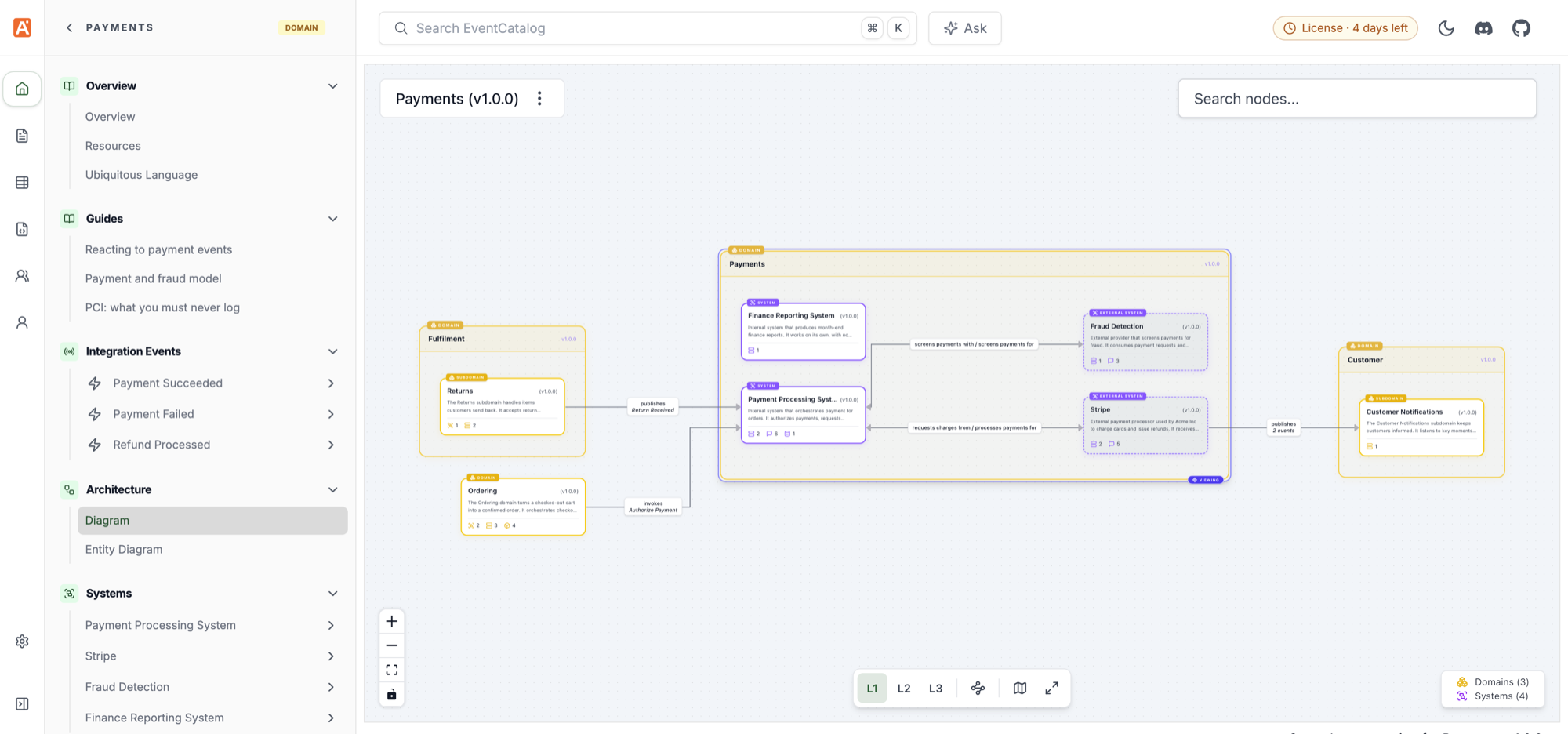
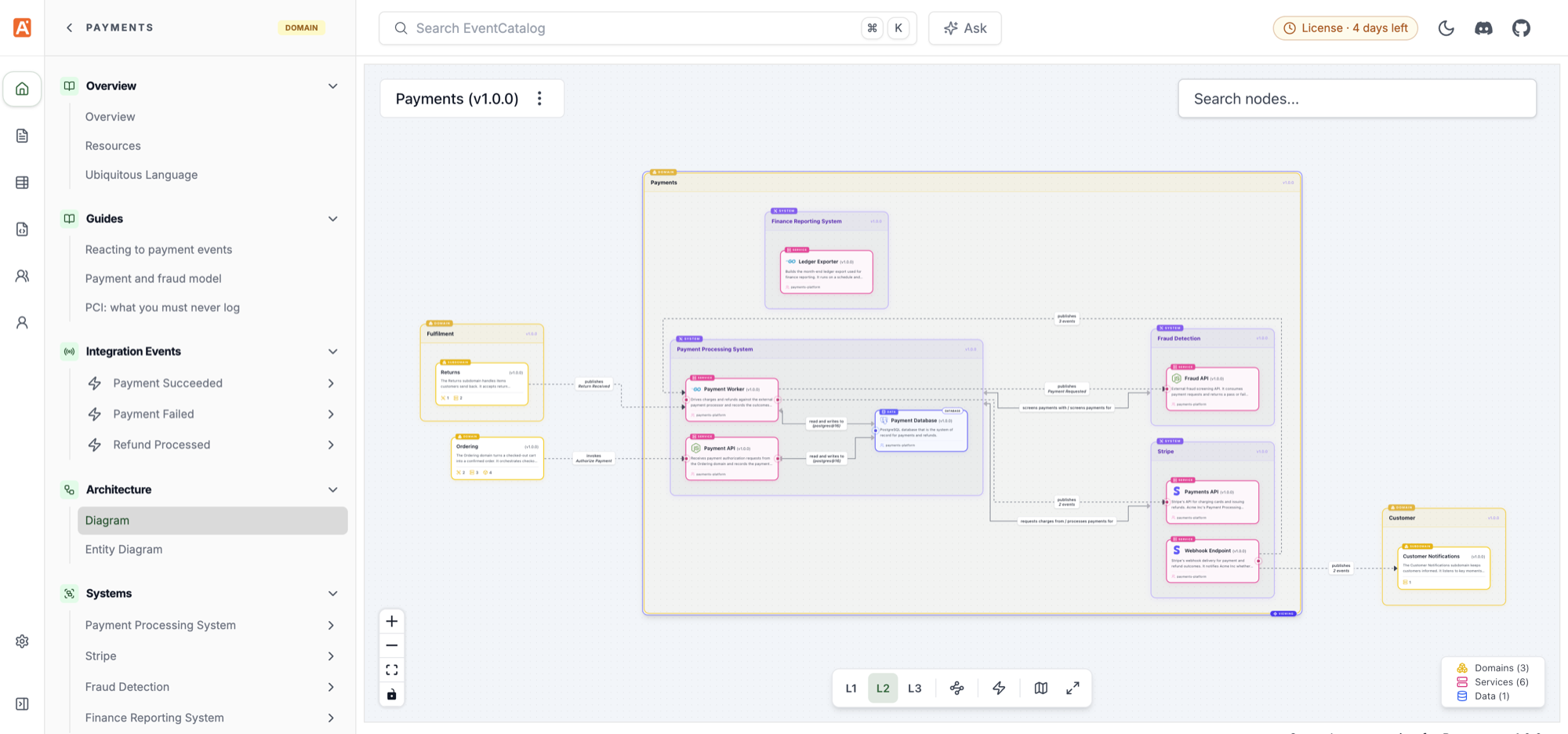
On a domain's diagram, the toolbar has Highlight cross-domain communication, which picks out the edges to and from other domains.
A system's Diagram shows the system context at L1, expands the system into its services at L2, and adds messages and channels at L3. Read more in System diagrams.
Group flows by domain, system or team
Flows can group their steps by domain, system, team, or domain then system, drawn as boxes or lanes. Use the Group by menu (top right, or press G). Groups come from the catalog, so your flows need no changes. The choice is kept in the URL (?group=system&groupStyle=boxes).
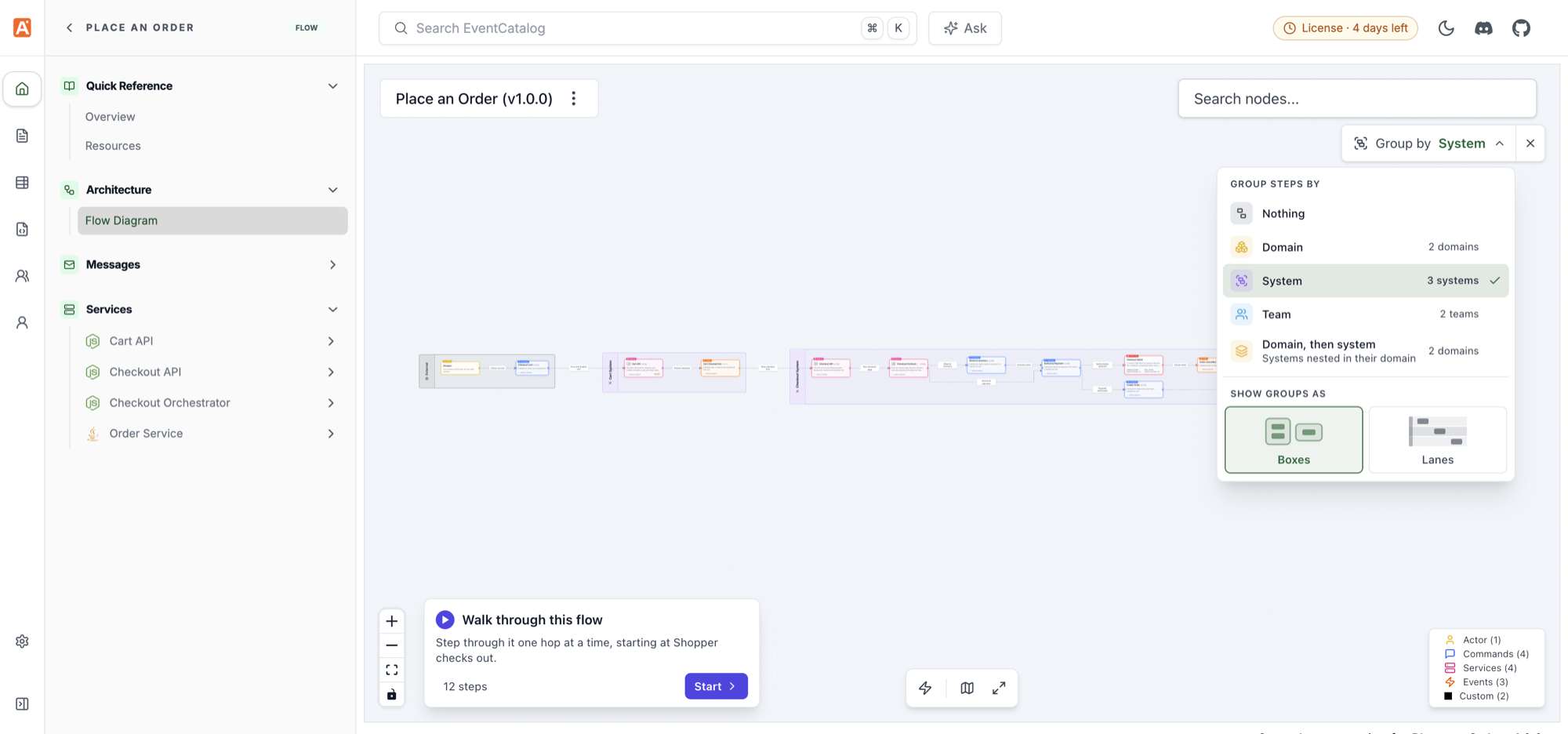
To start a flow grouped in your docs, use <Flow lanes="team" />. See the Flow component.
Flows no longer show the L1/L2/L3 levels. The step-by-step walkthrough is smaller and starts at the first step: it numbers the steps walked so far, rings the current step, and offers a dropdown at branches.
Channel flow steps
Flow steps can reference channels with channel: { id, version }. A step's title is now optional and defaults to the name of what it references. The SDK adds FlowBuilder.addChannelStep.
steps:
  - id: orders-topic
    channel:
      id: orders
      version: 1.0.0
    next_step: notify-customer
Read more in the flows documentation.
Resources pages for services, flows, channels and messages
Services, flows, channels, events, commands and queries now have a Resources page, like domains and systems, linked from Quick Reference in the sidebar. Every Resources page lists the decision records (ADRs) that apply to it, and has a Relationship column (for example Sends, Receives, Reads from, Writes to) with Inbound and Outbound filters.
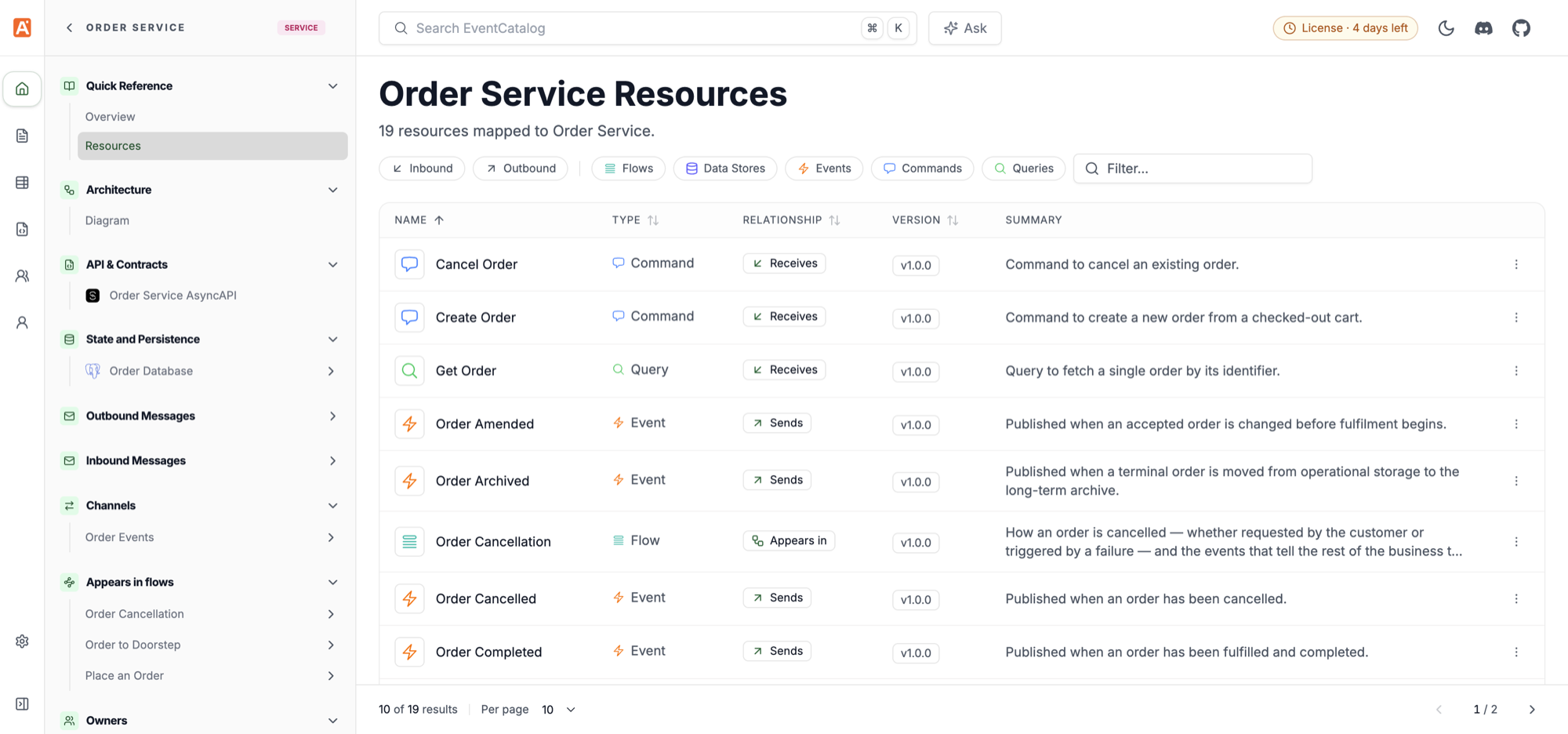
Read more about the service Resources page, the message Resources page and the channel Resources page.
Interactive diagrams and schemas in MCP clients
The MCP server has a new showResource tool. With view: "architecture" it returns a resource's diagram, built the same way as its Diagram page. With view: "schema" it shows a message's schema. In MCP clients that support MCP Apps (for example Claude, ChatGPT and VS Code) these open as interactive views. Other clients get Mermaid or the schema code.
Every MCP tool now has a title and is read-only, and versions are optional. Read more in interactive diagrams and schemas.
Settings > MCP lists domain MCP servers
Settings > MCP lists each domain's MCP server next to the Catalog MCP Server, with full URLs to copy. See the MCP server documentation.
License status in the CLI and Settings > License
eventcatalog dev and eventcatalog build show the catalog's license or trial in the terminal. While you run eventcatalog dev, the header shows the trial, or a reminder when your license is about to expire. The new Settings > License page shows who the catalog is licensed to and when the license expires.
Read more in License file.
Known issues
Please check EventCatalog issues on GitHub for any reported issues, or to file an issue yourself.