Add resources to systems
eventcatalog@4.0.0In EventCatalog, systems can directly reference:
Messages, APIs, schemas, and channels are usually documented through the services and messages inside the system.
Add resources using frontmatter
Add resources to the system frontmatter using services, flows, entities, and containers.
---
id: cart-system
name: Cart System
version: 1.0.0
# define services in this system
services:
  - id: cart-api
    version: 1.0.0
# define databases in this system
containers:
  - id: cart-database
    version: 1.0.0
# define documented business workflows part of this system
flows:
  - id: checkout-flow
    version: 1.0.0
# define any entities that belong to this system
entities:
  - id: cart
    version: 1.0.0
---
The version is optional. If no version is given, EventCatalog uses the latest version of the referenced resource.
Keep resources inside the system folder
You can also define resources inside the system folder to keep related architecture documentation together.
This structure makes the system the entry point for the resources that make up that capability.
Show the system's resources on its page
Add <NodeGraph /> to the system page to show the services and data stores inside the system, and the messages between them.
## Architecture

<NodeGraph />
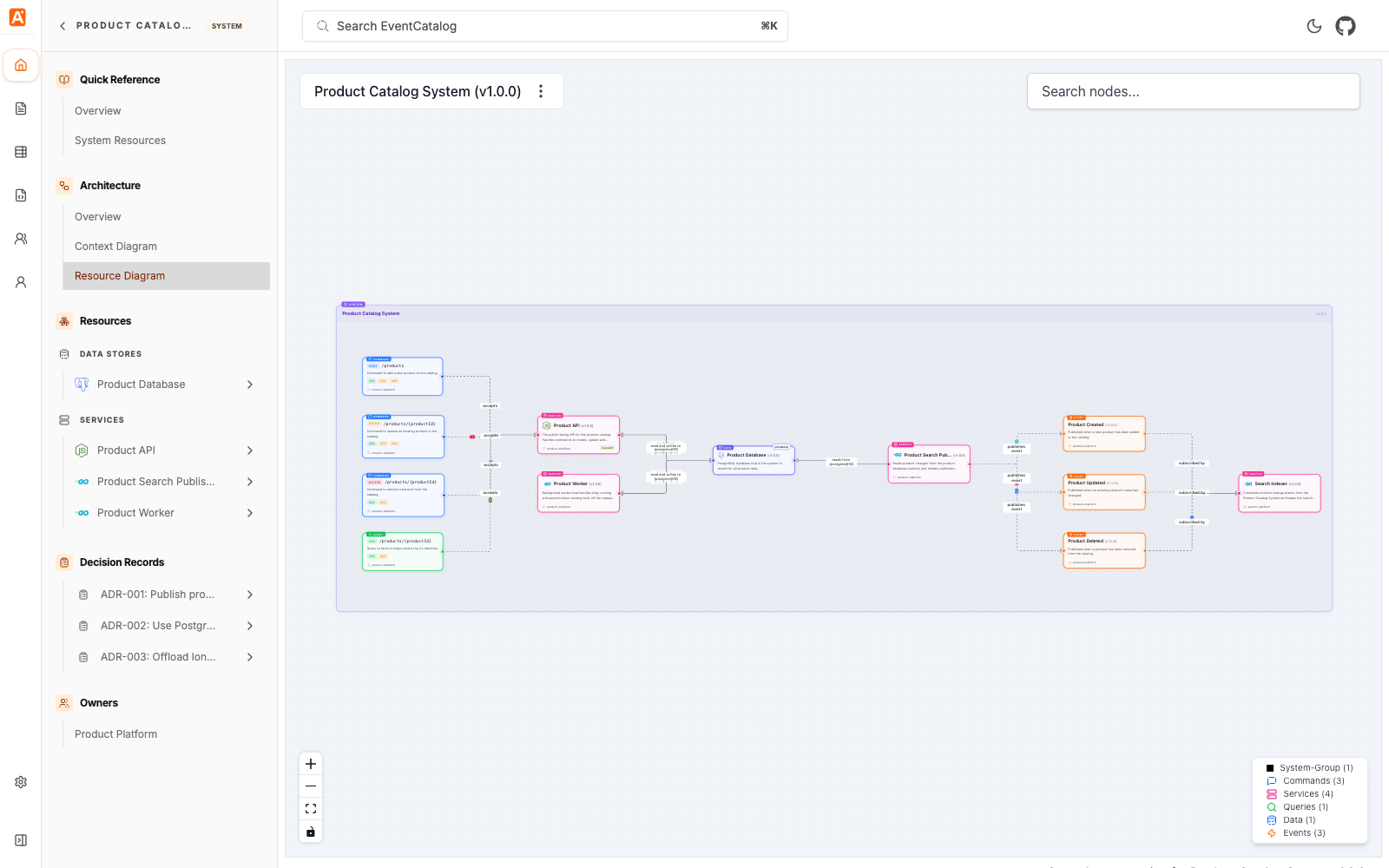
Each system also has a Diagram page, linked from the Architecture section of the system sidebar. Level 2 (L2) of the Diagram shows the services and data stores inside the system, and level 3 (L3) adds the messages and channels:
/visualiser/systems/{system-id}/{version}?level=2
Learn more in System diagrams.
Resources page
Every system with resources gets a Resources page that lists them in one table. Open it from Quick Reference > Resources in the system's sidebar, or go to:
/docs/systems/{system-id}/{version}/resources
The page lists the resources attached directly to the system:
| Resource | Where it comes from | Relationship |
|---|---|---|
| Services | The system's services | Contains |
| Flows | The system's flows | Contains |
| Entities | The system's entities | Owns |
| Data stores | The system's containers | Contains |
| Decision records | Any ADR whose appliesTo includes the system (add ADRs to resources) | Governed by |
Messages are not listed on a system's Resources page. To see them, open the Resources page of a service in the system.
The table has the same filters, sorting and row actions as the service Resources page. See Service resources page.
The sidebar link was called System Resources and is now Resources. The page now lists decision records and has a Relationship column. The system architecture overview page (/architecture/systems/{system-id}/{version}) is removed. Old links redirect to the Resources page, or to the system's docs page when it has nothing to list.
For the complete list of supported fields, see the systems reference.