Add usage examples
EventCatalog lets you attach examples to any message (event, command, or query). This can help your team understand exactly how your schemas can be used in your architecture and provide them with real examples.
Examples appear in the Schema Explorer under an Examples tab alongside the schema, properties, and version tabs.
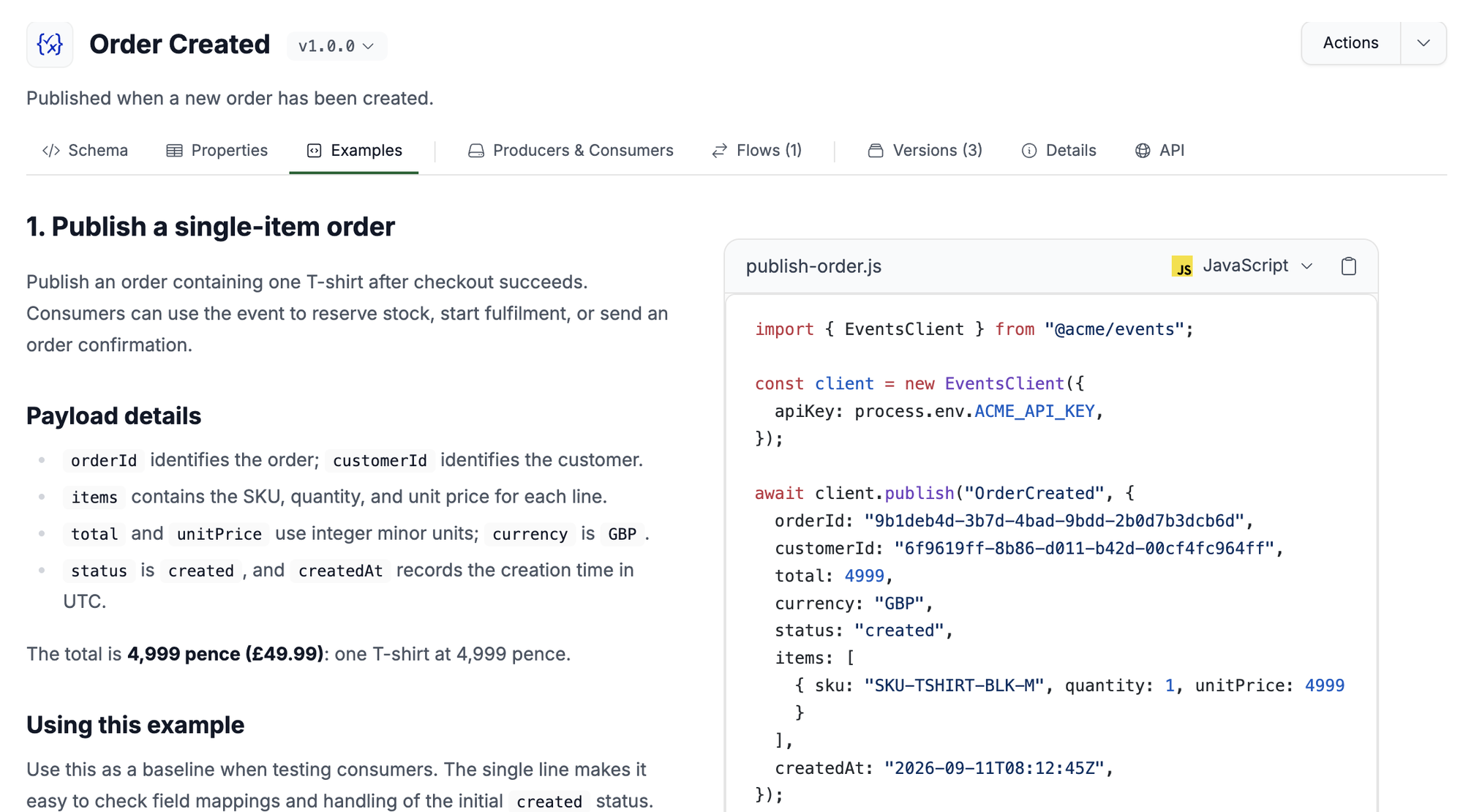
Add examples
Create an examples/ folder inside your message directory and drop in any example files. EventCatalog supports any text-based format: JSON, YAML, XML, Protobuf, Markdown, MDX, and more.
The Examples tab appears automatically when at least one example file is present. No frontmatter changes are required.
All examples for a message are shown on the same tab, one after another, ordered by file path.
Write examples in Markdown or MDX
eventcatalog@4.11.0Raw payloads show consumers the shape of a message, but not how to use it. Write your examples in Markdown or MDX to explain the scenario, call out important fields, and show code in more than one language.
Markdown and MDX examples are rendered as documentation, not as source code. Use <Columns /> to put the explanation next to the code, and <CodeGroup /> to show the same example in several languages.
On the schema page (/schemas/{type}/{id}/{version}), MDX examples can use any EventCatalog component. The preview panel on the /schemas/explorer list only supports <Columns />, <Column />, and <CodeGroup />, and shows MDX examples that use other components as source.
---
summary: Publish OrderCreated from checkout.
---

<Columns cols={2}>

<Column>

## Publish a single-item order

Publish an order containing one T-shirt after checkout succeeds.

### Payload details

- `orderId` identifies the order; `customerId` identifies the customer.
- `total` uses integer minor units; `currency` is `GBP`.

</Column>

<Column>

<CodeGroup dropdown>

```javascript publish-order.js
await client.publish("OrderCreated", {
  orderId: "9b1deb4d-3b7d-4bad-9bdd-2b0d7b3dcb6d",
  total: 4999,
  currency: "GBP",
});
```

```python publish_order.py
client.publish("OrderCreated", {
    "orderId": "9b1deb4d-3b7d-4bad-9bdd-2b0d7b3dcb6d",
    "total": 4999,
    "currency": "GBP",
})
```

</CodeGroup>

</Column>

</Columns>
Markdown and MDX examples support these frontmatter fields. Both are optional.
| Field | Type | Description |
|---|---|---|
title | string | Title for the example. When omitted, EventCatalog uses the first level-one heading, then the file name. |
summary | string | Short description shown above the example. |
You can put every example in a single examples/index.mdx file, or split them across several files. Use a horizontal rule (---) between examples in the same file to separate them.
Organise with subfolders
You can use nested folders to group related examples. EventCatalog displays all files in a flat list regardless of folder depth.
Add metadata
Place an examples.config.yaml (or .yml or .json) file inside the examples/ folder to add a display name, summary, and usage snippet to each example.
basic-order.json:
  name: Basic Order
  summary: A simple domestic order with a single item.
  usage: |
    curl -X POST http://localhost:3000/events/publish \
      -H "Content-Type: application/json" \
      -d @basic-order.json

international-order.json:
  name: International Order
  summary: An order with international shipping and customs information.
All fields are optional. When name is omitted, EventCatalog uses the filename without its extension.
| Field | Type | Description |
|---|---|---|
name | string | Display name for the example |
summary | string | Short description shown above the example |
usage | string | How-to-run snippet shown below the example |
For Markdown and MDX examples, you can use frontmatter instead of the config file. Values in examples.config.yaml take precedence.
Use the SDK
You can manage examples programmatically using the EventCatalog SDK.
import { addExampleToEvent, getExamplesFromEvent, removeExampleFromEvent } from '@eventcatalog/sdk';

// Add an example
await addExampleToEvent('OrderCreated', '1.0.0', {
  fileName: 'basic-order.json',
  content: JSON.stringify({ orderId: '123', total: 49.99 }, null, 2),
});

// Read all examples
const examples = await getExamplesFromEvent('OrderCreated', '1.0.0');

// Remove an example
await removeExampleFromEvent('OrderCreated', '1.0.0', 'basic-order.json');
Equivalent functions exist for commands (addExampleToCommand, getExamplesFromCommand, removeExampleFromCommand) and queries (addExampleToQuery, getExamplesFromQuery, removeExampleFromQuery).