Flow nodes types
Flow nodes are the building blocks of flows. They are used to represent the different steps in a flow.
With flow nodes you can reference your services, events, commands and queries, external systems, users (actors), data stores (containers), data products, or create your own custom nodes.
Common step properties
Every flow step (regardless of node type) supports these properties:
| Property | Type | Required | Description |
|---|---|---|---|
id | string | number | Yes | Unique identifier for the step |
title | string | Yes | The label displayed on the node in the flow diagram |
summary | string | No | A short description shown in the node sidebar |
type | "node" | "message" | "user" | "actor" | No | Hint for how the node should be rendered |
next_step | Step reference | No | The next step in the flow (cannot be used with next_steps) |
next_steps | Step reference[] | No | Multiple next steps for branching (cannot be used with next_step) |
Each step can only use one node type property. You cannot combine message, service, flow, container, dataProduct, actor, custom, or externalSystem on the same step.
Connecting steps
Use next_step or next_steps (not both) to connect steps together.
A step reference can be:
- A string or number matching another step's
id(e.g.next_step: "step-2") - An object with
idand an optionallabelfor the edge
# Simple reference
next_step: "step-2"

# Reference with edge label
next_step:
  id: "step-2"
  label: "on success"

# Multiple next steps (branching)
next_steps:
  - id: "step-success"
    label: "on success"
  - id: "step-failure"
    label: "on failure"
Flow node types
- default — A blank node type with just a title in your flow
- actor — Represents a person in your flow diagram
- externalSystem — Represents an external system in your flow diagram
- message — Represents an event, command or query resource in EventCatalog
- service — Represents a service resource in EventCatalog
- agent — Represents an agent resource in EventCatalog (added in EventCatalog 3.41.0)
- flow — Represents a flow in EventCatalog (added in EventCatalog 2.34.2)
- container — Represents a data store (container) resource in EventCatalog
- dataProduct — Represents a data product resource in EventCatalog
- custom — A custom node type with configurable title, summary, icon, properties and more
default node type
A blank node type with just a title in your flow. No additional properties are needed beyond the common step properties.
steps:
  - id: "step-1"
    title: "This value will be shown in the node on the flow diagram"
actor
Actor represents a person in your flow diagram.
Actor properties
| Property | Type | Required | Description |
|---|---|---|---|
name | string | Yes | The name of the actor |
summary | string | No | A short description of the actor (added in EventCatalog 2.55.6) |
steps:
  - id: "step-1"
    title: "Example Step of a Actor"
    actor:
      name: "Dave"
      summary: "This is a summary of the actor"
externalSystem
Represents an external system in your flow diagram.
External system properties
| Property | Type | Required | Description |
|---|---|---|---|
name | string | Yes | The name of the external system |
summary | string | No | A short description of the external system |
url | string (valid URL) | No | A link to the external system |
steps:
  - id: "step-1"
    title: "Example Step of a externalSystem"
    externalSystem:
      name: "Google"
      summary: "Search engine"
      url: "https://google.com"
message
Represents and refers to an event, command or query resource in EventCatalog.
Message properties
| Property | Type | Required | Description |
|---|---|---|---|
id | string | Yes | The id of the event, command or query in your catalog |
version | string | No | The version to reference (defaults to latest) |
steps:
  - id: "step-1"
    title: "Example Step of a Event"
    message:
      id: "order-placed"
      version: "0.0.1"
service
Represents and refers to a service resource in EventCatalog.
Service properties
| Property | Type | Required | Description |
|---|---|---|---|
id | string | Yes | The id of the service in your catalog |
version | string | No | The version to reference (defaults to latest) |
steps:
  - id: "step-1"
    title: "Example Step of a Service"
    service:
      id: "order-service"
      version: "0.0.1"
agent
eventcatalog@3.41.0Represents and refers to an agent resource in EventCatalog. Agents render as purple/violet nodes in the visualiser so they are easy to distinguish from services. When a flow references an agent, the agent's page shows a back-link to the flow.
Agent properties
| Property | Type | Required | Description |
|---|---|---|---|
id | string | Yes | The id of the agent in your catalog |
version | string | No | The version to reference (defaults to latest) |
steps:
  - id: "fraud_review"
    title: "Fraud Review Agent"
    agent:
      id: "FraudReviewAgent"
      version: "0.0.1"
    next_steps:
      - id: "payment_approved"
        label: "Approved"
      - id: "payment_declined"
        label: "Declined"
flow
eventcatalog@2.34.2Represents and refers to a flow resource in EventCatalog. Useful for reusing flows in your flow diagrams.
Flow properties
| Property | Type | Required | Description |
|---|---|---|---|
id | string | Yes | The id of the flow in your catalog |
version | string | No | The version to reference (defaults to latest) |
steps:
  - id: "step-1"
    title: "Example Step of a Flow"
    flow:
      id: "order-flow"
      version: "0.0.1"
Expand inline
eventcatalog@3.29.0Click a flow node in the visualiser to expand the referenced flow's steps inline. Use the Collapse button in the expanded node's header to restore the single-node view. The graph recentres automatically on both expand and collapse, and expanded steps join the parent flow's step walkthrough navigation.
container
eventcatalog@3.36.3Represents and refers to a data store (container) resource in EventCatalog. When a flow references a container, the container's sidebar automatically shows a "Flows" section linking back to the referencing flow.
Container properties
| Property | Type | Required | Description |
|---|---|---|---|
id | string | Yes | The id of the container in your catalog |
version | string | No | The version to reference (defaults to latest) |
steps:
  - id: "orders_db"
    title: "Orders DB"
    container:
      id: "orders-db"
      version: "1.0.0"
    next_step:
      id: "next_step"
      label: "Persist order records"
dataProduct
eventcatalog@3.36.3Represents and refers to a data product resource in EventCatalog. When a flow references a data product, the data product's sidebar automatically shows a "Flows" section linking back to the referencing flow.
Data product properties
| Property | Type | Required | Description |
|---|---|---|---|
id | string | Yes | The id of the data product in your catalog |
version | string | No | The version to reference (defaults to latest) |
steps:
  - id: "order_analytics"
    title: "Order Analytics"
    dataProduct:
      id: "order-analytics"
      version: "1.0.0"
    next_step:
      id: "next_step"
      label: "Prepare fulfillment KPIs"
custom
eventcatalog@2.30.6The custom node allows you to define any custom node you want in your flow diagram.
Use cases could include:
- A custom node that represents a scheduled job
- A custom node that represents a batch job
- A custom node that represents a decision
- A custom node that represents a process
- A custom node that represents an aggregate
Custom nodes can be anything you want.
You can view a UI example of a custom nodes here.
Custom node properties
| Property | Type | Required | Description |
|---|---|---|---|
title | string | Yes | The title shown on the node |
icon | string | No | Icon shown on the node (see Heroicons for the list of icons) |
type | string | No | A type label shown on the sidebar of the node (e.g. "Scheduler", "Database") |
summary | string | No | A short description of the node |
url | string (valid URL) | No | A link associated with the custom node |
color | string | No | The color of the node (see Tailwind colors) |
properties | Record<string, string | number> | No | Key-value pairs shown in the node. URL values are rendered as links |
height | number | No | The height of the node (be careful going too high, the diagram does not calculate the graph based on the height of nodes) |
menu | { label: string, url?: string }[] | No | Right-click context menu items |
UI Example
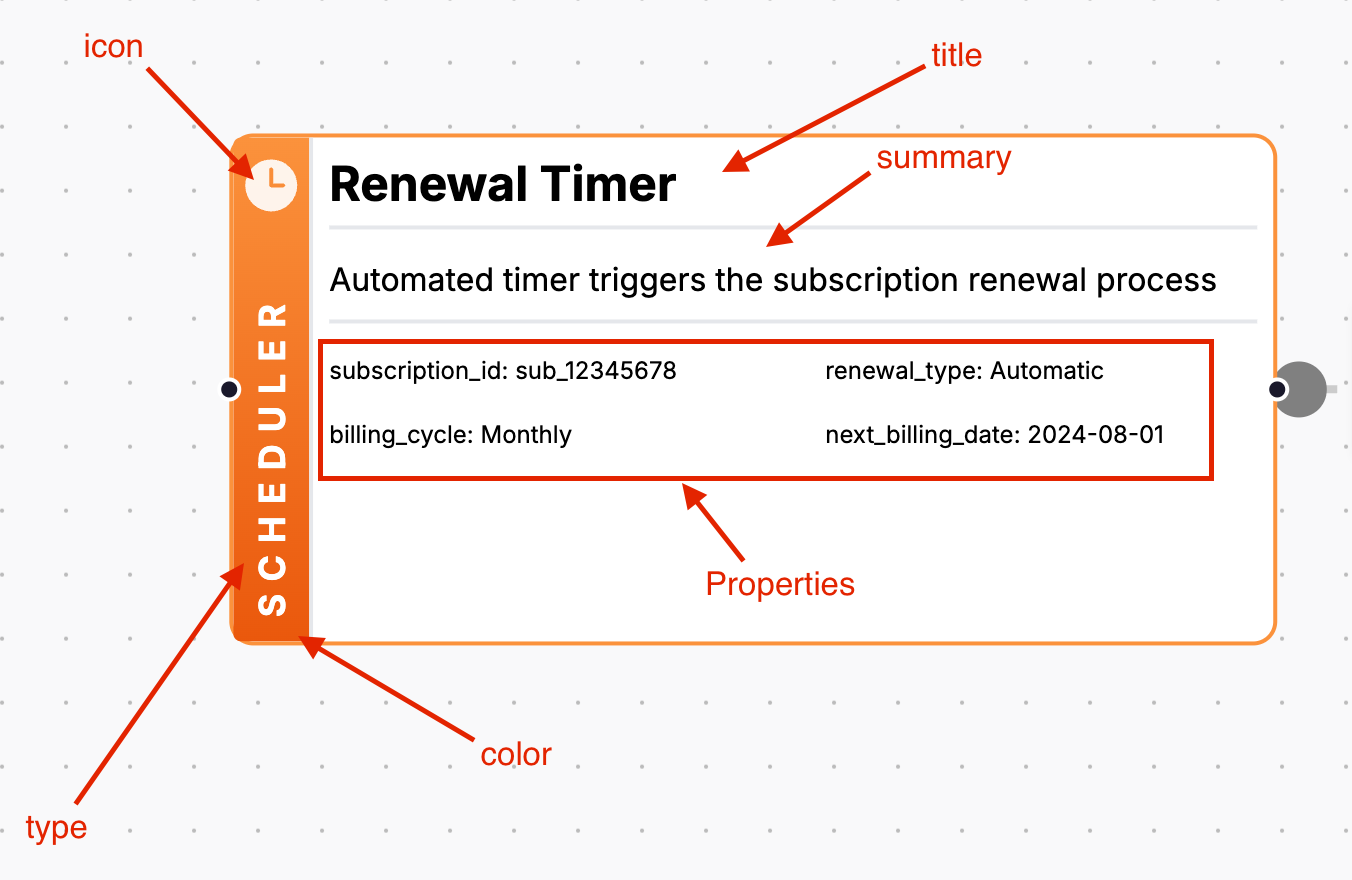
MDX Example
This example shows a custom node that represents a scheduler.
steps:
  - id: "renewal_timer_triggered"
    title: "Renewal Period Reached"
    custom:
      title: "Renewal Timer"
      color: "orange"
      icon: "ClockIcon"
      type: "Scheduler"
      summary: "Automated timer triggers the subscription renewal process"
      height: 8
      properties:
        subscription_id: "sub_12345678"
        renewal_type: "Automatic"
        billing_cycle: "Monthly"
        next_billing_date: "2024-08-01"
      menu:
        - label: "View scheduler configuration"
          url: "https://docs.example.com/scheduler"
        - label: "Subscription timing documentation"
          url: "https://docs.example.com/subscription-timing"
    next_step:
      id: "check_subscription_status"
      label: "Verify subscription status"
You can find a full example on GitHub here.