Referencing diagrams from resources
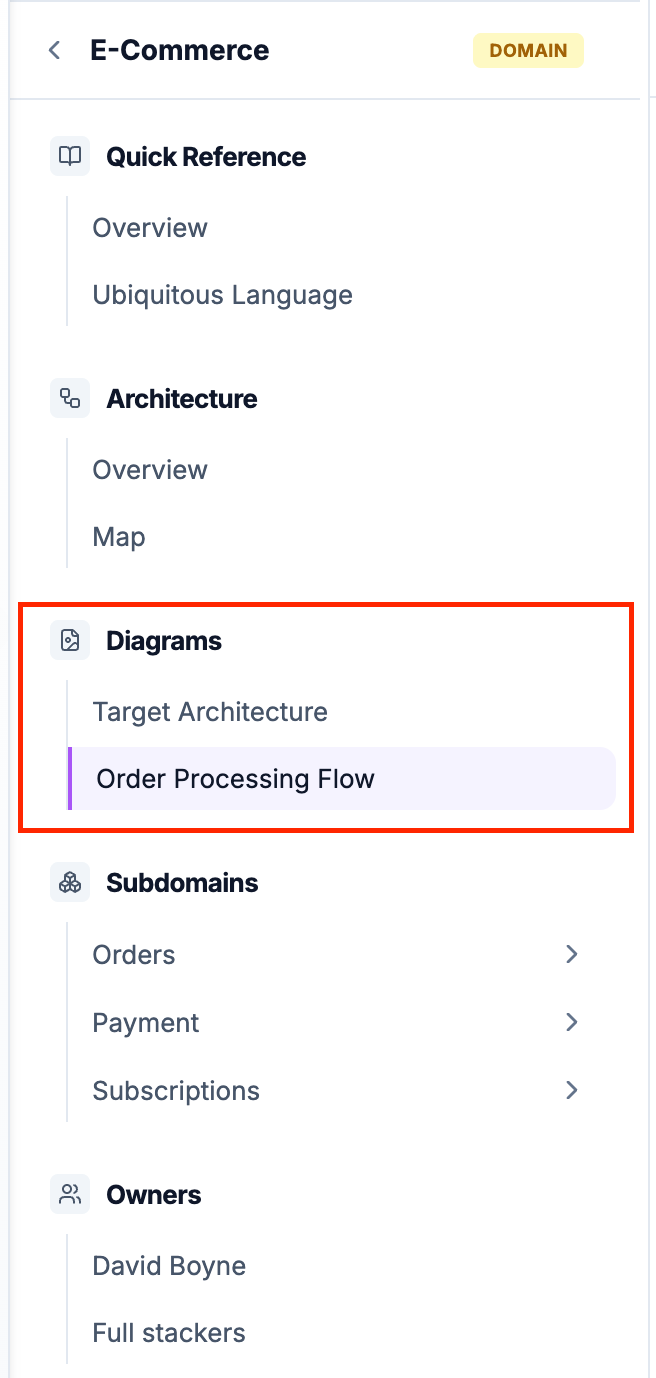
eventcatalog@3.3.0One of the key benefits of diagrams in EventCatalog is that they can be referenced from multiple resources. This allows you to create reusable visual documentation that appears in the sidebar of your domains, services, messages, and containers.
How diagram references work
When you reference a diagram from a resource, EventCatalog automatically:
- Adds the diagram to the resource's sidebar under a "Diagrams" section
- Creates a clickable link to the full diagram page
- Shows the diagram name and summary in the sidebar
Referencing diagrams in frontmatter
To reference diagrams from any resource, use the diagrams field in the frontmatter:
diagrams:
  - id: diagram-id
    # version is optional and defaults to latest if not specified
    version: 1.0.0
The version field is optional and defaults to latest if not specified.
Examples
Referencing diagrams from a domain
Domain-level diagrams often show the overall architecture, domain boundaries, or integration patterns.
---
id: E-Commerce
name: E-Commerce Domain
version: 1.0.0
summary: Core business domain for our e-commerce platform
diagrams:
  - id: target-architecture
    version: 1.0.0
  - id: order-flow
    version: 1.0.0
---

## Overview

The E-Commerce domain handles all order processing...
When users view the E-Commerce domain, they'll see a "Diagrams" section in the sidebar with links to both the "Target Architecture" and "Order Flow" diagrams.
Referencing diagrams from a service
Service-level diagrams typically show API flows, service interactions, or internal component architecture.
---
id: OrderService
name: Order Service
version: 2.0.0
summary: Manages order lifecycle and orchestration
diagrams:
  - id: order-api-flow
    version: 2.0.0
  - id: order-state-machine
    version: 1.0.0
---

## Overview

The Order Service is responsible for...
Referencing diagrams from a message
Message-level diagrams can show sequence flows, event propagation, or payload structures.
---
id: OrderCreated
name: Order Created
version: 1.0.0
summary: Published when a new order is created
diagrams:
  - id: order-creation-flow
    version: 1.0.0
---

## Event Details

This event is published when...
Referencing diagrams from a container
Container-level diagrams often illustrate data models, schema relationships, or access patterns.
---
id: OrdersDatabase
name: Orders Database
version: 1.0.0
container_type: database
technology: PostgreSQL 14
diagrams:
  - id: orders-schema-diagram
    version: 1.0.0
  - id: data-access-patterns
    version: 1.0.0
---

## Database Overview

The Orders database stores...
Diagram versioning in references
You can reference specific versions of diagrams or use latest to always point to the most recent version:
diagrams:
  # Reference a specific version
  - id: system-architecture
    version: 2.1.0

  # Reference the latest version (default if version is omitted)
  - id: api-flow
    version: latest

  # Version field is optional - defaults to latest
  - id: sequence-diagram
Use specific versions when you want to preserve historical accuracy (e.g., showing the architecture as it was at that resource version). Use latest when the diagram is continuously updated and you always want to show the current state.
Organizing diagram references
For resources with multiple diagrams, organize them logically:
diagrams:
  # High-level overviews first
  - id: domain-context
    version: 1.0.0

  # Detailed flows second
  - id: checkout-flow
    version: 2.0.0
  - id: payment-flow
    version: 2.0.0

  # Implementation details last
  - id: database-schema
    version: 1.5.0
The diagrams will appear in the sidebar in the order you list them.
Viewing referenced diagrams
When viewing a resource that references diagrams, users will see:
- A "Diagrams" section in the sidebar navigation
- Each diagram listed with its name
- Clicking a diagram navigates to the full diagram page
- The diagram page includes version selection and full content
Diagram reusability
The same diagram can be referenced from multiple resources. For example, a "System Context" diagram might be referenced from:
- The main domain
- Multiple services within that domain
- The architecture documentation
This reusability ensures consistency and reduces duplication while allowing teams to organize documentation in the way that makes most sense for their use case.