Creating external systems
eventcatalog@3.28.0External systems are services your architecture integrates with but does not own — Stripe, Twilio, Snowflake, Auth0, and similar third-party providers. They behave like any other service in EventCatalog: they can send and receive messages, be versioned, have owners, and carry specifications. The only difference is how they are presented — purple with a Globe icon and an "External System" badge in the visualiser, and grouped under a dedicated "External Systems" section in the sidebar (or "External Integrations" when inside a domain).
Creating an external system is identical to creating a regular service — just add externalSystem: true to the frontmatter.
Example: modelling Stripe
Here is an example modelling Stripe as an external system. Stripe receives a ChargeCard command from your PaymentGatewayService and sends back StripeChargeSucceeded and StripeChargeFailed webhook events.
---
id: Stripe
name: Stripe
version: 1.0.0
summary: External payment processor used to charge customer cards.
externalSystem: true
receives:
  - id: ChargeCard
    version: 0.0.1
sends:
  - id: StripeChargeSucceeded
    version: 0.0.1
  - id: StripeChargeFailed
    version: 0.0.1
---

## Overview

Stripe is used to process card payments. We send a `ChargeCard` command and Stripe
webhooks back `StripeChargeSucceeded` or `StripeChargeFailed` to complete the round trip.

<NodeGraph />
Your paired PaymentGatewayService would mirror this — sends: [ChargeCard] and receives: [StripeChargeSucceeded, StripeChargeFailed] — giving you a complete integration contract visible in the visualiser.
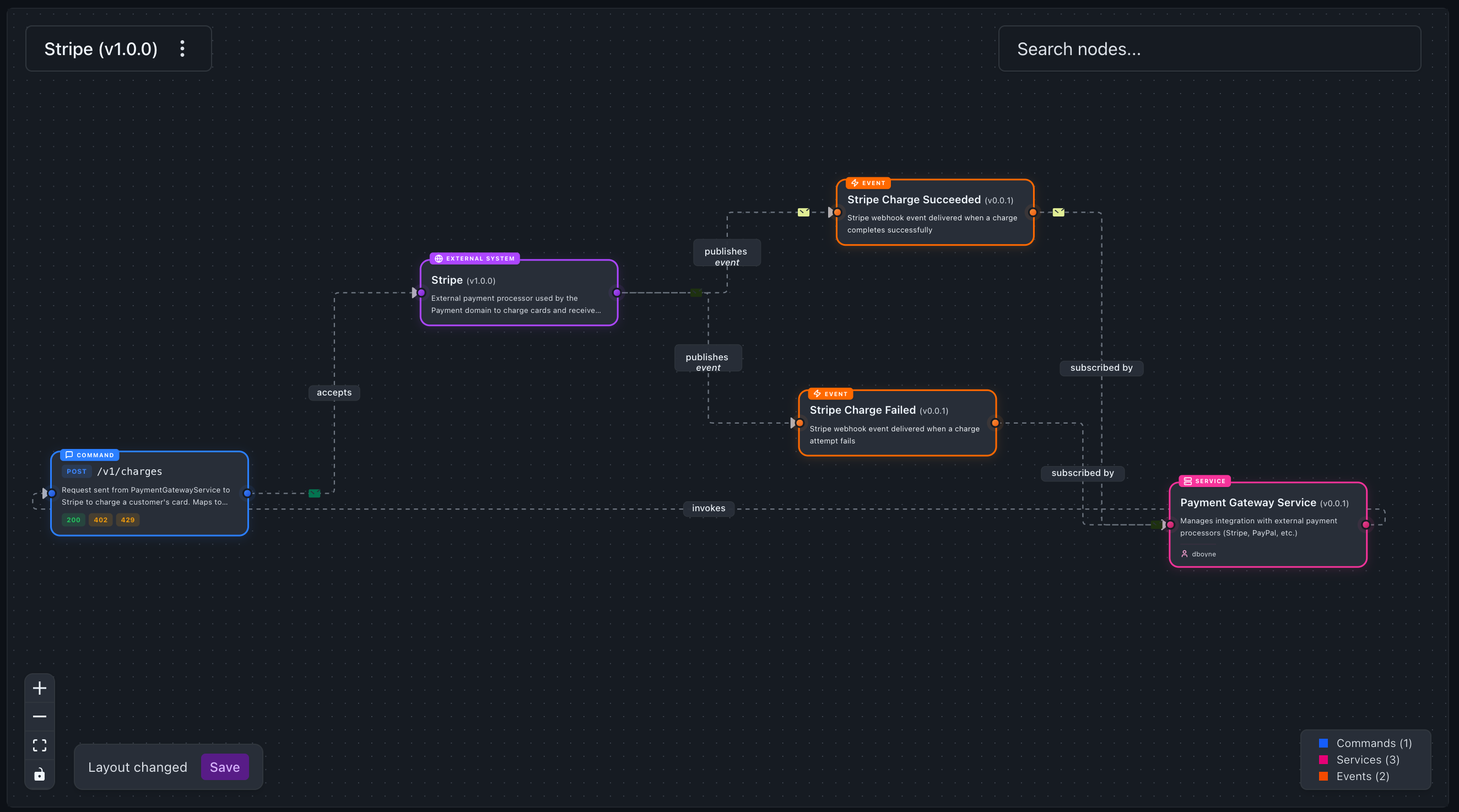
Modelling third-party systems this way lets you document exactly what you call and what they call back, see external dependencies cleanly separated from your own services on the visualiser, and reason about which of your services depend on which third parties.
Custom icon
eventcatalog@3.28.1Set styles.icon to brand your external system with its real logo. The icon appears in the visualiser node, sidebar navigation, page header, and search results.
---
id: Stripe
name: Stripe
version: 1.0.0
externalSystem: true
styles:
  icon: https://cdn.simpleicons.org/stripe
---
The value can be a path to a file in your catalog's public/ folder (e.g. /icons/stripe.svg) or an absolute URL. Simple Icons CDN is a convenient source for brand logos — use https://cdn.simpleicons.org/<slug> where <slug> matches the service name.