Domain frontmatter API
Overview
Domains are just markdown files, with this comes the use of Content, MDX components and also front-matter.
Here is an example of the domain frontmatter you will find in your domain files.
---
# id of your domain, used for slugs and references in EventCatalog.
id: Orders

# Display name of the domain, rendered in EventCatalog
name: Orders

# Version of the domain
version: 0.0.1

# Short summary of your domain
summary: |
  Domain that contains order related information

# Optional owners, references teams or users
owners:
    - dboyne

# Optional services. Groups services into this domain.
services:
    - id: PaymentService
      version: 0.0.1

# Optional flows associated with this domain
flows:
    - id: OrderProcessing
      version: 1.0.0

# Optional messages this domain sends _(added in 3.7.0)_
sends:
    - id: OrderCreated
      version: 1.0.0

# Optional messages this domain receives _(added in 3.7.0)_
receives:
    - id: PaymentInitiated
      version: 1.0.0

# Optional badges, rendered to UI by EventCatalog
badges:
    - content: New domain
      backgroundColor: blue
      textColor: blue
      # Optional icon to display (from https://heroicons.com/)
      # Or the name of the broker (e.g Kafka, EventBridge, etc)
      icon: BoltIcon
---

## Overview

Domain that contains all services that are related to the orders domain within FakeCompany.

<NodeGraph />
Required fields
id
- Type:
string
Unqiue id of the domain. EventCatalog uses this for references and slugs.
---
  id: Orders
---
name
- Type:
string
Name of the domain this is used to display the name on the UI.
---
  name: My orders domain
---
version
- Type:
string
Version of the domain.
---
  version: 0.0.1
---
Optional fields
summary
Short summary of your domain, shown on domain summary pages.
---
  summary: |
    Domain that contains everything about orders
---
owners
An array of user ids that own the domain.
---
  owners:
    - dboyne
    - mSmith
---
services
An array of services ids that belong to the this domain. Which services belong to this domains bounded context.
---
  services:
    - id: InventoryService
    - id: OrderService
      # Optional version of the service, latest version is used if not provided
      version: 0.0.1
---
entities
eventcatalog@2.36.0An array of entities ids that belong to the this domain. Which entities belong to this domains bounded context.
---
  entities:
    - id: Order
    - id: OrderItem
      # Optional version of the entity, latest version is used if not provided
      version: 0.0.1
---
flows
An array of flows ids that are associated with this domain.
---
  flows:
    - id: OrderProcessing
    - id: PaymentFlow
      # Optional version of the flow, latest version is used if not provided
      version: 1.0.0
---
sends
eventcatalog@3.7.0An array of messages ids that this domain sends/publishes.
In domain driven design these can be classed as domain events, which are events that are published by the domain.
This allows you to document messags (e.g events) at a domain level and have services document them as the implementation of the domain event.
You can store messages anywhere in your catalog. If you prefer you can store them in your domain folder. But remember you can also reference them in your services anyway.
domains/
  Orders/
    events/
      OrderCreated/
        index.mdx
---
  sends:
    - id: OrderCreated
    - id: PaymentProcessed
      # Optional version of the message, latest version is used if not provided
      version: 1.0.0
---
receives
eventcatalog@3.7.0An array of messages ids that this domain receives.
These typically are messages that are consumed by your domain (external messages).
You can store these anywhere in your catalog, and your domain can just reference them.
---
  receives:
    - id: PaymentInitiated
    - id: FraudDetected
      # Optional version of the message, latest version is used if not provided
      version: 0.0.1
---
badges
eventcatalog@3.39.4An array of badges that get rendered on the page.
---
  badges:
    - content: My badge
      backgroundColor: green
      textColor: green
      # Optional icon to display (from https://heroicons.com/)
      # Or the name of the broker (e.g Kafka, EventBridge, etc)
      icon: BoltIcon
---
Use named colors
Set backgroundColor or textColor to a named palette token for automatic light/dark mode adaptation.
Supported names: slate, gray, zinc, neutral, stone, red, orange, amber, yellow, lime, green, emerald, teal, cyan, sky, blue, indigo, violet, purple, fuchsia, pink, rose.
---
  badges:
    - content: Critical
      backgroundColor: red
      textColor: red
---
Use any CSS color
You can also pass any valid CSS color value directly: hex (#ff0000), rgb(), hsl(), oklch(), or a CSS variable (var(--my-color)).
---
  badges:
    - content: Custom
      backgroundColor: "#6366f1"
      textColor: "#ffffff"
---
Link to external URLs
eventcatalog@3.39.6Add a url to a badge to make it render as a clickable link with an external-link icon. When url is omitted, the badge renders as a plain label.
---
  badges:
    - content: View Runbook
      url: https://runbooks.example.com/my-domain
      backgroundColor: blue
      textColor: white
---
specifications
eventcatalog@2.6.0Specifications to include on the page
eventcatalog@2.39.1You can assign one or more specifications to a domain.
---
  specifications:
    - type: asyncapi
      path: order-service-asyncapi.yaml
      name: AsyncAPI Specification
    - type: openapi
      path: openapi.yml
      name: OpenAPI Specification
    - type: graphql
      path: graphql.yml
      name: GraphQL Specification
---
| Property | Type | Required | Description |
|---|---|---|---|
type | string | Yes | The type of specification, currently only asyncapi and openapi are supported |
path | string | Yes | The path to the specification file |
name | string | No | Optional friendly name of the specification, rendered in the UI |
Older versions of EventCatalog (< 2.39.0)
If you are using an older version of EventCatalog you will need to use the following syntax.
---
  specifications:
    asyncapiPath: order-service-asyncapi.yaml
    openapiPath: openapi.yml
---
visualiser
eventcatalog@2.39.2Turn off the visualiser for this resource. This means the resource will not be included in the visualiser or the navigation bar for the visualiser.
Default: true
---
  visualiser: false
---
editUrl
eventcatalog@2.49.4Override the default edit url for the page. This is used to navigate the user to the edit page for the page (e.g GitHub, GitLab url).
---
  editUrl: https://github.com/event-catalog/eventcatalog/edit/main/domains/Orders/index.mdx
---
detailsPanel
eventcatalog@2.53.0Override the default details panel for the page. You can use this show/hide areas of the details panel.
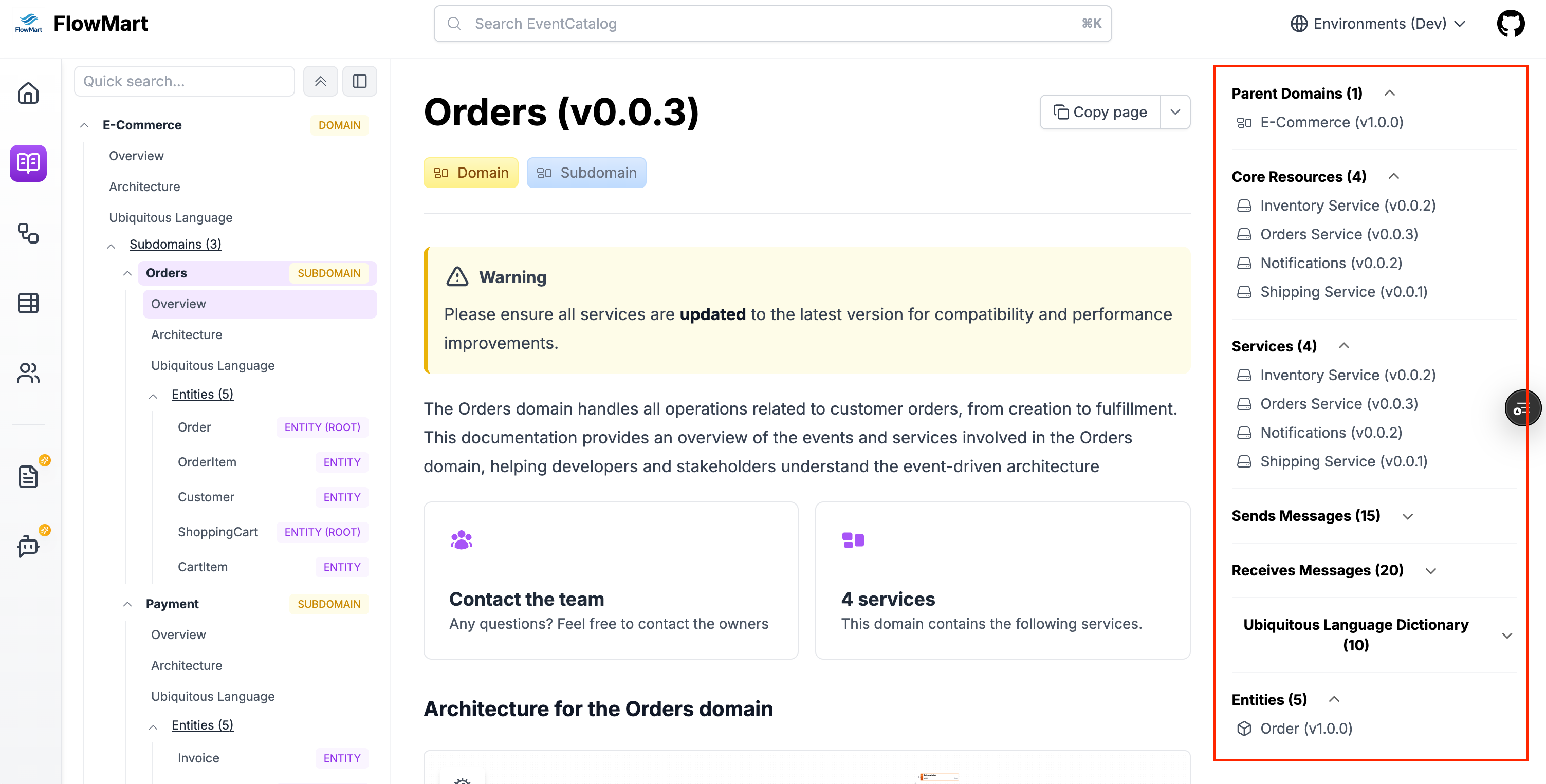
---
  detailsPanel:
    services:
      visible: false
    entities:
      visible: true
    messages:
      visible: false
    ubiquitousLanguage:
      visible: false
---
Options:
| Property | Type | Required | Description |
|---|---|---|---|
services | object | No | An object with a visible property to show/hide the services section |
entities | object | No | An object with a visible property to show/hide the entities section |
messages | object | No | An object with a visible property to show/hide the messages section (sends and receives) |
ubiquitousLanguage | object | No | An object with a visible property to show/hide the ubiquitous language section |
repository | object | No | An object with a visible property to show/hide the repository section (e.g GitHub, GitLab url) |
versions | object | No | An object with a visible property to show/hide the versions section |
owners | object | No | An object with a visible property to show/hide the owners section |
changelog | object | No | An object with a visible property to show/hide the changelog button |
attachments
eventcatalog@2.57.2An array of attachments for this resource type.
---
  attachments:
    - url: https://example.com/adr/001
      title: ADR-001 - Use Kafka for asynchronous messaging
      description: Learn more about why we chose Kafka for asynchronous messaging in this architecture decision record.
      type: 'architecture-decisions'
      icon: FileTextIcon
    - https://example.com/adr/002
---
Options:
The attachments can be a url (string) or an object with additional properties.
Object properties:
| Property | Type | Required | Description |
|---|---|---|---|
url | string | Yes | The url of the attachment |
title | string | optional | The title of the attachment |
description | string | optional | The description of the attachment |
type | string | optional | The type of the attachment, this will be used to group attachments together in the UI |
icon | string | optional | The icon of the attachment, you can pick from the lucide icons library. |