The EventCatalog OpenAPI generator now lets you define consumer services with optional route-based filtering, so you can document the full producer-consumer picture directly from your OpenAPI specs.
Understanding who owns an API is useful. Understanding who consumes it is what makes the documentation actually actionable.
The EventCatalog OpenAPI generator has always let you document the services that produce your APIs. Today it can also document the downstream services that consume them, with fine-grained control over which routes each consumer receives.
Half the picture was missing
When you generate documentation from an OpenAPI spec, you get a clear view of the owner: the service that owns the API, the routes it exposes, the schemas for each request and response. That's useful.
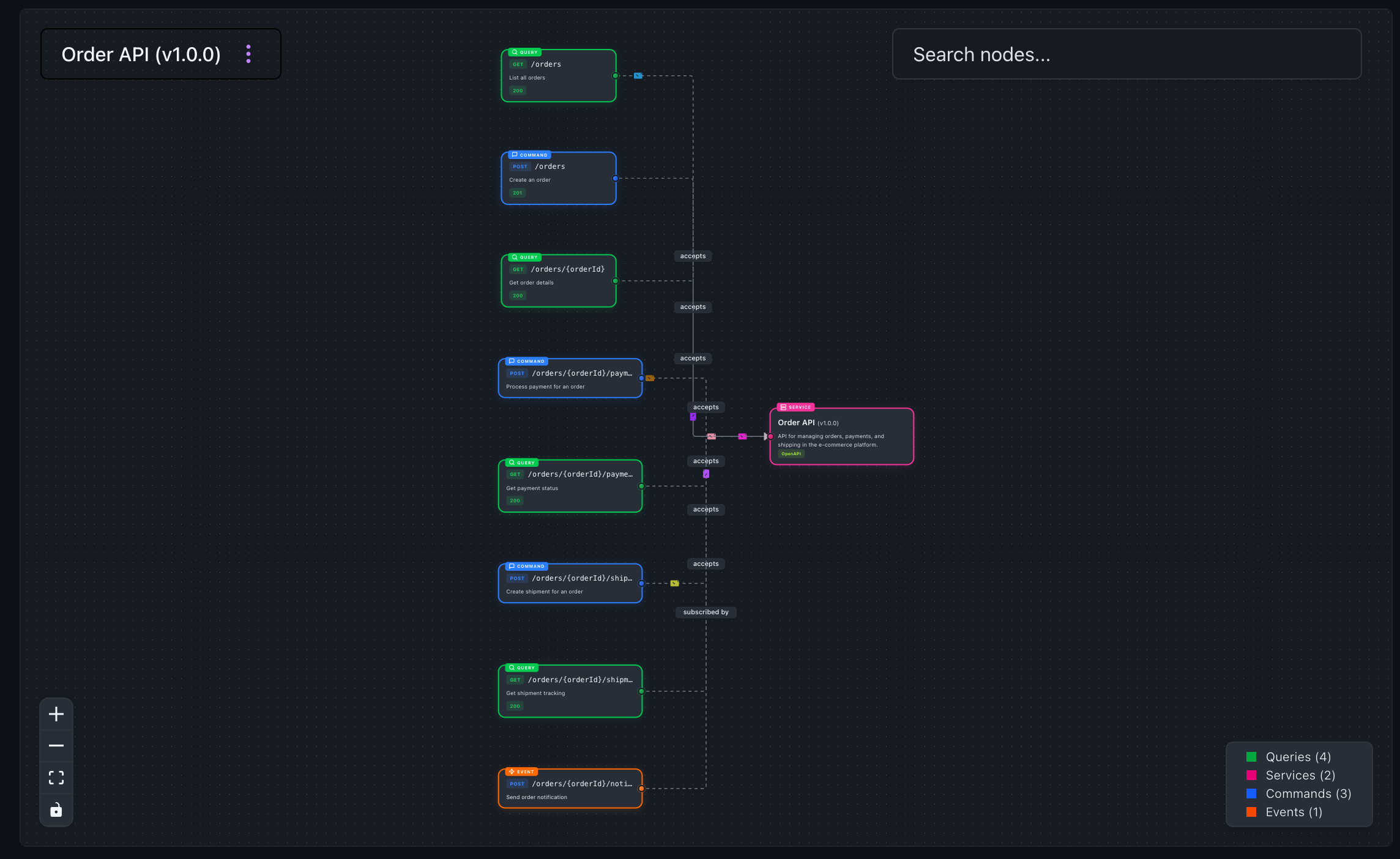 Visualization of the endpoints for the Orders Services
What it doesn't capture is the downstream side. Which services depend on the payment endpoint? Which team owns the mobile client that calls /orders/*/status? Who breaks when you change the /shipments response schema?
That information exists somewhere, usually spread across wikis, Slack threads, and individual engineers' heads. It rarely makes it into the catalog because there was no structured place to put it.
What's new
The OpenAPI generator now supports a consumers array on each service configuration. Each entry defines a downstream service that calls endpoints produced by that API, with an optional routes filter to scope which endpoints it cares about.
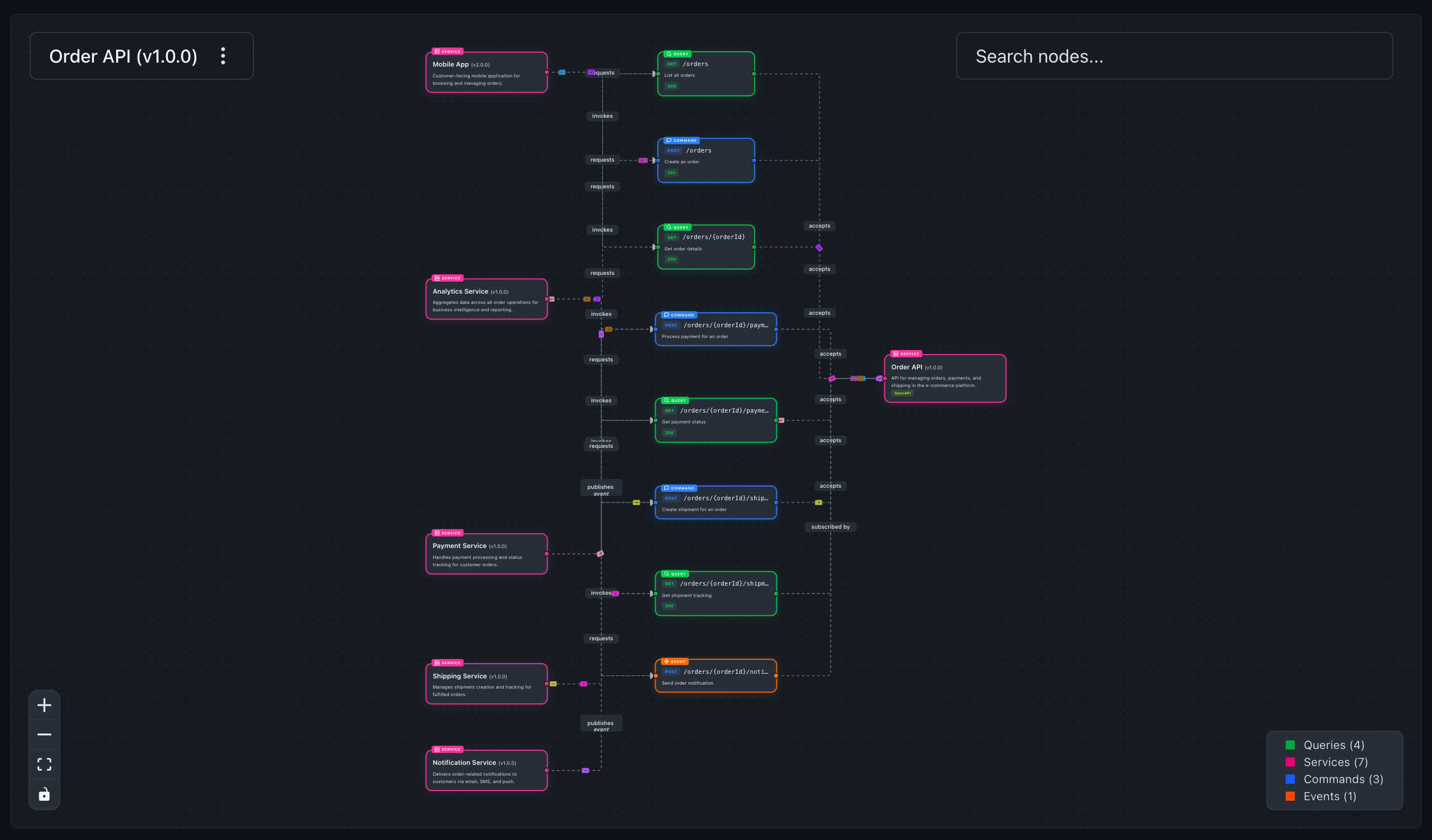 Visualization shows which services are calling what endpoints of the Orders Service
When you'd use it
If you have a shared API gateway or platform API that multiple teams consume, this gives each consuming team a first-class presence in your catalog. If you're planning a schema change and need to know who would be affected, the consumer relationships are now queryable and visible in the visualizer. If your domain contains services that receive data from an OpenAPI-backed service, you can document those relationships without hand-editing every service file.
How it works
Using your OpenAPI files you can automate documentation, visualizations, and schemas in EventCatalog.
To document consumers of your API, you need to define the consumers in the EventCatalog configuration file.
generators: [
  [
    '@eventcatalog/generator-openapi',
    {
      services: [
        {
          path: 'openapi.yml',
          id: 'order-api',
          consumers: [
            // Payment service only cares about payment endpoints
            { id: 'payment-service', version: '1.0.0', routes: [{ suffix: '/payments' }] },
            // Shipping service consumes shipment endpoints
            { id: 'shipping-service', version: '1.0.0', routes: [{ suffix: '/shipments' }] },
            // Analytics consumes everything (no filter)
            { id: 'analytics-service', version: '1.0.0' },
            // Mobile app uses wildcard to match specific patterns
            { id: 'mobile-app', routes: [{ match: '/orders/*/status' }] },
          ],
        },
      ],
    },
  ],
],
EventCatalog will parse your OpenAPI file and will match any routes to your downstream services (consumers of the services).
Route filtering
The routes filter gives you precise control over which endpoints each consumer is associated with. Four matching strategies are available:
| Key | Behavior |
|---|---|
path | Exact match on route path |
prefix | Matches routes that start with the given string |
suffix | Matches routes that end with the given string |
match | Wildcard pattern where * matches any path segments |
Multiple keys within a single filter object are combined with AND logic (the route must satisfy all conditions). Multiple filter objects in the routes array are combined with OR logic (the route needs to satisfy at least one object).
So routes: [{ prefix: '/orders', suffix: '/status' }] matches routes that start with /orders AND end with /status. And routes: [{ suffix: '/payments' }, { suffix: '/shipments' }] matches routes ending in either /payments OR /shipments.
Getting started
Head over to our OpenAPI Integration, and install the plugin on your EventCatalog instance. If you have an OpenAPI file you try EventCatalog in a couple of seconds at try.eventcatalog.dev.
Once you install the plugin for EventCatalog add a consumers array to your existing OpenAPI generator configuration and run the generator. That's it. No manual service file editing required.
If you haven't set up the OpenAPI generator yet, start with the installation guide. For the full configuration reference including consumers, see the plugin configuration docs.
Summary
The OpenAPI generator now captures both sides of the API relationship: who produces it and who consumes it. Consumer services are created or updated automatically, with route-based filtering so each service only receives the messages it actually cares about.
Your OpenAPI spec already knows your routes. Now your catalog can know your consumers too.
Questions and feedback are welcome on Discord or open an issue on GitHub.