# Data Contracts
Copy as Markdown[View as Markdown](/docs/development/guides/data-products/contracts.md)
***
**Added in** `eventcatalog@3.8.0`
Contracts define the schema structure for data product outputs. They provide clear expectations for downstream consumers and enable schema validation.
Your contracts can be any format you want (e.g JSON Schema, ODCS YAML, etc).
## What are contracts?[](#what-are-contracts "Direct link to What are contracts?")
Contracts are schema specifications attached to data product outputs. They document the structure, types, and constraints of the data your product produces.
Contracts help teams:
* Understand output data structures without inspecting code
* Validate data against expected schemas
* Catch breaking changes before deployment
* Enable self-service data consumption
## Supported formats[](#supported-formats "Direct link to Supported formats")
EventCatalog supports any schema or specification format.
## Adding contracts[](#adding-contracts "Direct link to Adding contracts")
Contracts are defined in the `outputs` array of your data product frontmatter.
/data-products/PaymentAnalytics/index.mdx
```
---
id: payment-analytics
name: Payment Analytics
version: 1.0.0
outputs:
- id: payment-analytics-db
contract:
path: payment-metrics-contract.json
name: Payment Metrics Contract
type: json-schema
---
```
Contract properties:
* **path** is the file path relative to the data product directory
* **name** is the display name shown in EventCatalog
* **type** specifies the format (`json-schema` or `odcs`)
## Viewing contracts[](#viewing-contracts "Direct link to Viewing contracts")
EventCatalog provides a schema explorer for viewing contracts.
Use the `` component to display contracts in your documentation:
```
## Output Schema
```
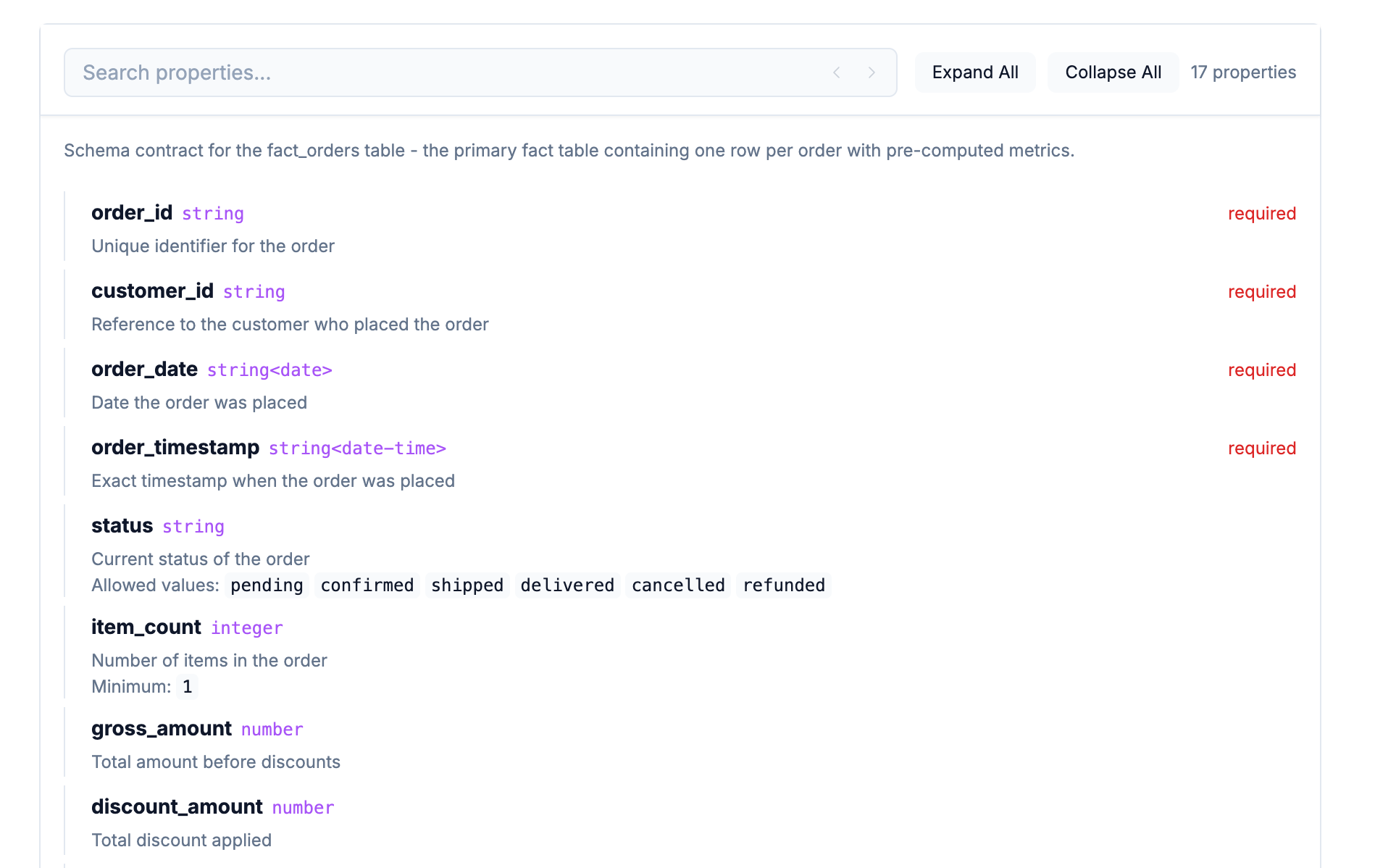
The schema explorer renders:
* Interactive field navigation
* Type information and constraints
* Field descriptions
* Required field indicators
## Multiple contracts[](#multiple-contracts "Direct link to Multiple contracts")
A single output can have multiple contracts for different tables or datasets.
```
outputs:
- id: analytics-warehouse
contract:
path: fact-orders.json
name: Fact Orders
type: json-schema
- id: analytics-warehouse
contract:
path: dim-customers.json
name: Customer Dimension
type: json-schema
```
## Next steps[](#next-steps "Direct link to Next steps")
* [Version data products](/docs/development/guides/data-products/versioning.md)
* [Add to domains](/docs/development/guides/data-products/adding-to-domains.md)
* [Schema explorer component](/docs/development/components/using-components.md)